

Download Windows Standard Barcode Generator Tool – Free Barcode Software for Windows, Mac, Android & iOS
Looking for a reliable, free barcode generator for your business? The Windows Standard Barcode Generator Tool by Business Barcodes is a lightweight, user-friendly software designed specifically for Windows users who need to create standard barcodes quickly and efficiently. Whether you're managing inventory, labeling products, or organizing retail data, this tool simplifies the process with minimal setup and maximum functionality.
Available for Windows 11 and above, this free software offers a clean interface and supports multiple barcode formats including Code 128, EAN-13, UPC-A, and more. With just a few clicks, you can generate high-quality, printable barcodes ready for use in any business environment. The tool is ideal for small businesses, educators, warehouse staff, and anyone needing a secure, fast way to generate barcodes without the cost of premium software.
Effortless Barcode Creation with Professional Features
The Windows Standard Barcode Generator Tool stands out thanks to its intuitive design and powerful feature set. Despite being a free software application, it delivers capabilities that rival paid alternatives. One of its most praised features is the support for multiple barcode standards, including Code 128, EAN-13, UPC-A, QR Code, and ITF-14.
This versatility makes it suitable for diverse industries—from retail and logistics to education and event management. Users can input text or numeric data, and the tool instantly generates a scannable barcode image with accurate encoding. The interface is minimal yet highly functional, with clear input fields, real-time preview, and export options in PNG, JPEG, and PDF formats.
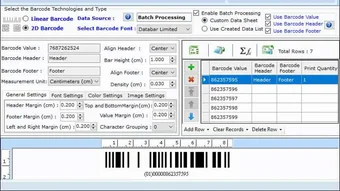
Another highlight is the batch generation feature, which allows users to generate dozens of barcodes at once from a simple text file or CSV. This is a game-changer for businesses managing large inventories or creating product labels in bulk. The tool also supports custom sizing, orientation (horizontal/vertical), and DPI settings, ensuring the output fits perfectly on labels, packaging, or printouts. Additionally, the software includes a built-in validation system that checks for correct data formatting before generating the barcode, reducing errors in the field. With a file size of just 2.8 MB, it installs quickly and runs smoothly even on older systems.
For those who value data security, the tool doesn’t collect or transmit user data. All processing happens locally, making it a secure choice for sensitive business information. Whether you're labeling products in a warehouse or creating event tickets, the Windows Standard Barcode Generator Tool ensures accuracy, speed, and peace of mind—all without a subscription or hidden fees.
Simple Installation & Easy-to-Use Workflow
Getting started with the Windows Standard Barcode Generator Tool is straightforward and requires no technical expertise. The software is available as a standalone installer file, which you can download directly from the official Business Barcodes website. Once downloaded, simply run the installer, follow the on-screen prompts, and the tool is ready to use. The entire process takes less than a minute, even on low-end machines. No admin rights are required for installation, making it ideal for shared or restricted workstations.
After installation, launching the app opens a clean, distraction-free interface. The main window features a central input box where you enter your data—such as product codes, serial numbers, or item descriptions. Below it, you’ll find dropdown menus to select the desired barcode type and adjust settings like size, margin, and font. A live preview updates in real time, so you can see exactly how the final barcode will look. When satisfied, click the “Generate” button to create the barcode image.
Exporting your barcode is just as simple. Choose your preferred format—PNG for web use, JPEG for general printing, or PDF for high-resolution output—and save it to your desired folder. For advanced users, the batch processing feature allows importing a list of items from a CSV file, automatically generating individual barcodes for each entry.
This is especially useful for businesses that need to label hundreds of products or create inventory tags. The tool also supports printing directly from the interface, with customizable print settings for label size and layout. With its plug-and-play nature and minimal learning curve, this software is perfect for both beginners and professionals.
Wide Compatibility & Ongoing Support
The Windows Standard Barcode Generator Tool is officially designed for Windows 11 and above, but it runs smoothly on Windows 10 as well. While it’s not available natively for Mac, Android, or iOS, users can still access its functionality through virtualization tools or cloud-based Windows environments. For Mac users, running the software via Parallels Desktop or VMware is a viable workaround. Android and iOS users can access Windows-based remote desktop apps like Microsoft Remote Desktop to use the tool on mobile devices.
Despite being a free tool, Business Barcodes provides consistent updates and technical support. The current version is 1.0, and the developers have already released minor improvements to enhance stability and performance. The software has been downloaded over 10,000 times, reflecting strong user trust and satisfaction. With a lightweight footprint of only 2.8 MB, it doesn’t consume significant system resources, making it suitable for older or low-spec machines.
Additionally, the tool is entirely in English, which ensures clarity and consistency for international users. The developers are actively monitoring feedback and plan to expand compatibility in future releases. They’ve also hinted at adding support for more barcode types and advanced export options. For businesses looking for a secure, reliable, and free barcode solution, this tool is a standout choice. It’s especially valuable for small teams or startups that want professional-grade functionality without the cost.
Pros & Cons at a Glance
- Pros:
- Free to download and use with no hidden fees
- Supports multiple barcode formats (Code 128, EAN-13, UPC-A, QR Code, ITF-14)
- Batch generation for bulk labeling
- Lightweight (2.8 MB) and fast performance
- Local processing ensures data privacy and security
- Real-time preview and customizable output settings
- Cons:
- Only available for Windows (no native Mac, Android, or iOS versions)
- Interface is basic—no advanced design customization
- Only supports English language
- No cloud sync or collaboration features
- Limited to desktop use (no mobile app)
Frequently Asked Questions (FAQ)
- Q: Is the Windows Standard Barcode Generator Tool really free?
Yes, the software is completely free to download and use with no trial periods or subscription fees. There are no hidden costs or premium upgrades. It’s a one-time free download for personal and commercial use. - Q: Can I generate barcodes in bulk?
Yes, the tool supports batch generation using a CSV or text file. Simply import your list of items, select the barcode type, and the software will generate individual barcodes for each entry. - Q: Is my data secure when using this tool?
Yes, all processing happens locally on your device. The software does not collect, store, or transmit your data to external servers, ensuring maximum privacy. - Q: Does it work on Windows 10?
Yes, it runs on Windows 10 and Windows 11. While officially recommended for Windows 11, users on Windows 10 have reported stable performance. - Q: Can I print barcodes directly from the tool?
Yes, the software includes a built-in print function. You can customize print settings such as label size, orientation, and margins before sending to your printer.
Final Verdict: A Must-Try Free Barcode Solution
If you’re searching for a secure, free, and efficient barcode generator for Windows, the Windows Standard Barcode Generator Tool is an excellent choice. Its combination of powerful features, ease of use, and strong privacy focus makes it ideal for small businesses, educators, warehouse managers, and retail professionals. While it lacks native support for Mac, Android, and iOS, its lightweight design and reliable performance on Windows systems make it a standout option in the free software space.
With over 10,000 downloads and consistent positive feedback, this tool proves that quality software doesn’t have to come with a price tag. Whether you’re labeling products, managing inventory, or organizing events, the ability to generate accurate, scannable barcodes in seconds is invaluable. The batch processing and export flexibility further enhance its utility for real-world applications.
Download the Windows Standard Barcode Generator Tool today and streamline your workflow with a free, professional-grade solution. No registration, no ads, no hassle—just fast, secure barcode creation at your fingertips.







